Lost your files? Don't panic! Dig them up with DiskDigger.
DiskDigger® is a tool that undeletes and recovers lost files from your hard drive, memory cards, USB flash drives — you name it! Whether you accidentally deleted some documents or photos from your computer, reformatted your camera's memory card, or want to see what files are lurking on an old USB drive, DiskDigger is here for you. See the complete list of features to learn more.
DiskDigger has already helped millions of users around the world recover their lost files. What can it help you find today? Download it now and see for yourself!
Works on all versions of Windows, with the latest Beta version working on Linux and macOS.
More news for November 2018
Sat, 11/17/2018 - 20:28 — Dmitry Brant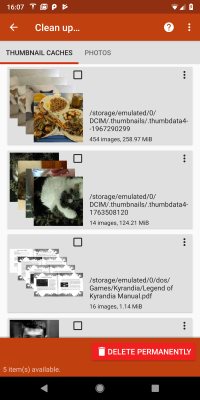
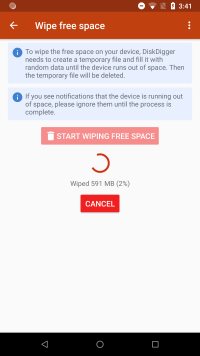 Following up on the new "Clean up" feature introduced earlier to DiskDigger for Android, I'm happy to introduce another brand new feature that adds a related capability: wiping free space. This is useful for ensuring that your deleted files (which are now considered free space in your device's memory) will no longer be recoverable, even with tools like DiskDigger.
The new "Wipe free space" feature can be accessed directly from the main screen of the DiskDigger app (underneath the selections of Basic Scan and Full Scan). It can also be accessed while performing a Full Scan by tapping the "Clean up" button.
Like the "Clean up" feature, the "Wipe free space" feature is still a bit experimental, so you should be aware of some of its caveats and limitations:
- Wiping of free space is done by creating a temporary file and filling it with random data, until it consumes the entire amount of free space on your device. When the temporary file begins to reach the limit of free space, the Android system will usually display a notification that your available space is running out. You should ignore this notification until the wipe process is complete. When it finishes, it will delete the temporary file and free up the remaining space again.
- It is possible that the Android system will stop DiskDigger from being able to write to the temporary file before the memory is completely full. This means that there is a possibility that not all of the free space will be wiped, and some deleted data might still be recoverable. You can always re-run DiskDigger and scan your device's memory to ensure whether the wipe was successful.
- The wiping is done only on the internal memory of the device. The ability to wipe an external SD card will be added in a future version.
- It's important to note that because the wiping is done by overwriting all the free space, it means that the process inflicts a significant amount of wear on the device's memory. This can potentially shorten the life span of the memory, and should be performed sparingly, and only when necessary.
These clean-up features are currently available only in the Android version of DiskDigger, but are currently in development for the Windows version, too. As always, for all your data recovery needs, download DiskDigger for Windows, or DiskDigger for Android!
News for November 2018
Fri, 11/16/2018 - 13:06 — Dmitry Brant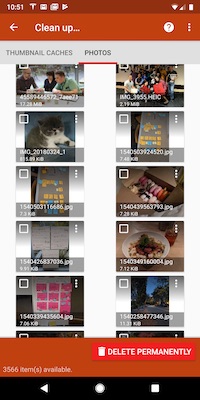 Time for another great update to DiskDigger for Android! Over the last few months, more and more users have requested the ability to delete the photos and other files that are found by DiskDigger, so that they can no longer be recovered by anyone else. This update makes a significant step in that direction:
After completing the scan of your device, the app now offers you the ability to enter Cleanup Mode, accessible by tapping the "Clean up" button, where you can select the items you'd like to delete, and remove them permanently.
This feature is still very new and a bit experimental, so there are a few points to keep in mind when using it:
- Cleanup Mode is currently available only in the Basic Scan. Making it available in the Full (rooted) scan is quite a bit more complex, and will be available in a future version.
- The Cleanup screen is divided into two tabs: "Thumbnail caches" and "Photos." This is because a thumbnail cache (a file that contains multiple thumbnails) must be deleted as a whole, which would delete all the thumbnails contained in it. Therefore the app allows you to examine these thumbnail caches, as well as individual photos, and select which ones you want to delete.
- Since the deletion is done at the filesystem level, the contents of the deleted files are not physically wiped from the device's memory, and may still be recoverable if the device is rooted. In fact, even physical wiping of the files' contents is unreliable with flash memory, which employs wear-leveling that might redirect the overwritten data to a different physical location.
In the near future, look for further enhancements and updates to the Cleanup feature. And as always, DiskDigger for Android and DiskDigger for Windows are still the best choice for your data recovery needs.
News for August 2018
Sun, 08/05/2018 - 23:56 — Dmitry Brant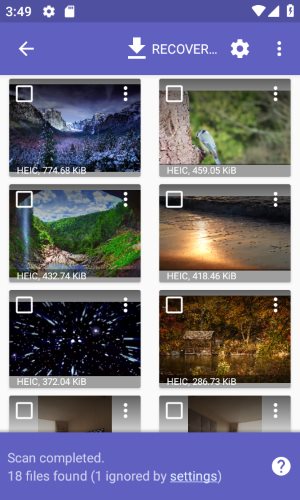 I'm happy to announce that DiskDigger for Android now supports recovering HEIF images (High Efficiency Image Format), as well as HEVC videos. The upcoming release of Android P is planned to support saving photos from the camera using the new HEIF format, and DiskDigger is now ready to recover them in case they are accidentally deleted.
- Recovering HEIF images is supported in the Basic scan as well as the Full scan. However, the Basic scan is only able to recover these types of images from your device's thumbnail cache. The Full scan, which can detect HEIF images throughout your device's internal memory, the device must be rooted.
- You can use DiskDigger to recover HEIF images from any version of Android (not just Android P). However, the app can only display previews of HEIF images when running in Android 8 (Oreo) or above.
DiskDigger for Windows, on the other hand, has already been able to recover HEIF images for a while now. If your Android device uses a microSD card for storing photos or videos, it's recommended to remove the card and connect it to your PC using a card reader, and scan it using the Windows version of DiskDigger.
News for June 2018
Sun, 06/24/2018 - 19:20 — Dmitry BrantTime for another excellent update to DiskDigger for Windows, as well as the DiskDigger app for Android. Here's what's new in this release of the Windows version:
- Support for more variants of E01 (forensic disk image) files.
- Improved detection and recovery of Windows thumbcache files.
- Improved handling of errors when scanning disks (due to bad sectors, I/O errors, etc).
- Support for recovery of RSA certificates in "Dig Deeper" mode.
- Fixed some possible performance issues when recovering JPG and ZIP files.
- Improved detection and recovery of .GZ archives.
- Improved preview of raw sector bytes, with arbitrary navigation to any sector.
- Improved recovery of highly-fragmented files in NTFS when using "Dig deep" mode.
- Improved detection of extended MBR partitions.
And here are the updates for the Android version:
- Fixed some possible performance issues when recovering JPG and ZIP files.
- Improved support and performance on lower-memory devices.
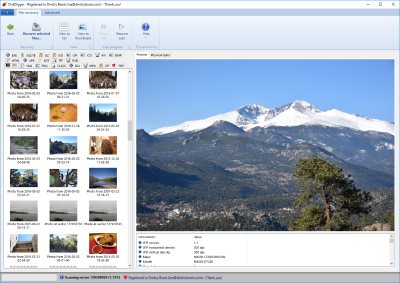
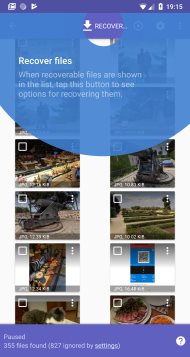
As always, DiskDigger is ready to be your tool of choice for recovering files from your PC and any storage media it can read.
News for January 2018
Wed, 01/03/2018 - 23:44 — Dmitry BrantIt's time for some more significant updates to the Windows and Android versions of DiskDigger! Here is what's new in the latest version of DiskDigger for Windows:
- Revamped and improved support for scanning disk images. Ideal for professional forensic analysis, as well as personal recovery of disk images, all of these types of disk images are supported:
- E01 and EWF images (Expert Witness Format) saved by EnCase and various other tools. If the image is broken into multiple segments (E01, E02, etc.), just open the E01 segment and DiskDigger will detect the other segments automatically, as long as they are in the same folder.
- VMDK images, used by VMware.
- VDI images, used by VirtualBox.
- VHD images, used by Microsoft VirtualPC.
- Plain 'dd' raw images.
- Open any of the above disk image types by launching DiskDigger and clicking the Advanced tab, where you should see the option to scan a disk image. Once you select the image file, the type of the image will be detected automatically.
- E01 files themselves can now be recovered in "dig deeper" mode.
- Support for recovering FLIF (Free Lossless Image Format) images.
- Improved support for recovering .TAR.GZ archives.
The Android version of the DiskDigger app now has the following updates:
- Improved support and compatibility with Android Oreo.
- Fixed some potential issues when saving recoverable files to an external SD card. Previously it was possible to see "access denied" errors when saving files to an SD card, which was due to incorrect usage of Android's SAF (Storage Access Framework).
- Improved ability to permanently delete individual files from Basic Scan results. It's currently not possible to delete files from a Full (rooted) scan, but this is planned for a future update.
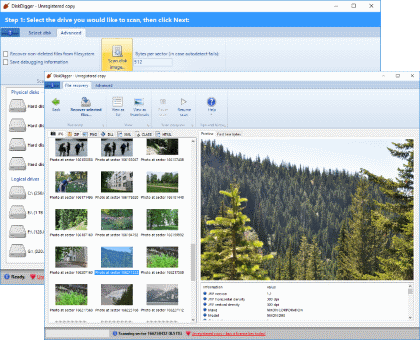
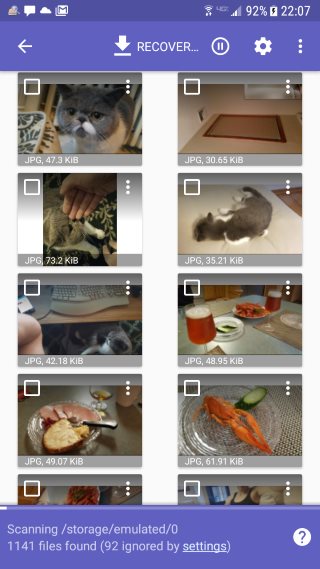
Download DiskDigger for Windows to recover data on your PC, or use the Android app to recover data from the internal memory of your Android device!
News for October 2017
Mon, 10/09/2017 - 23:36 — Dmitry BrantTime for some exciting updates to the DiskDigger app for Android! Here is what's new in the latest version:
- You can now permanently delete selected items from the list of recoverable files. This will physically overwrite the selected files, making them virtually impossible to recover using any software tools, including DiskDigger. Delete files individually by tapping the overflow menu next to each file, or tap the checkbox to select multiple files, and tap the main overflow menu in the toolbar.
- The app now supports a wider range of rooted devices (for certain devices, the previous version of the app was not properly detecting them as rooted).
- The performance and memory usage of the app has been improved, leading to fewer out-of-memory errors, especially when working with large numbers of files.
- A lot of minor bugs and crashes have been fixed. This is the most stable release of the app to date.
- DiskDigger now has a minimum requirement of Android 4.0 (Ice Cream Sandwich). For older devices (Honeycomb and earlier), the previous version of the DiskDigger app will continue to be available on the Google Play Store, but these older devices will not receive further updates.
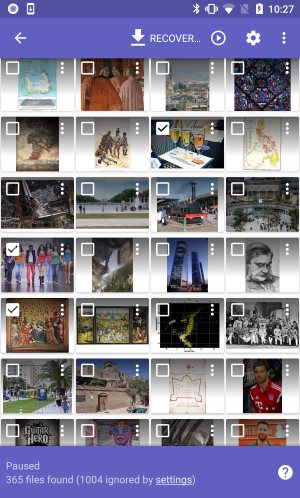
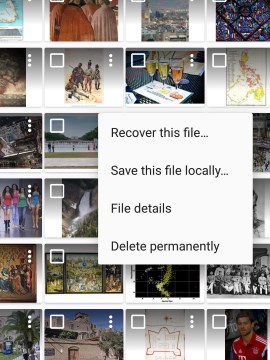
And as always, DiskDigger for Windows is there if you need to recover photos, documents, videos, or any other files from your PC, memory cards, USB drives, and most other storage media.
News for September 2017
Mon, 09/04/2017 - 20:36 — Dmitry Brant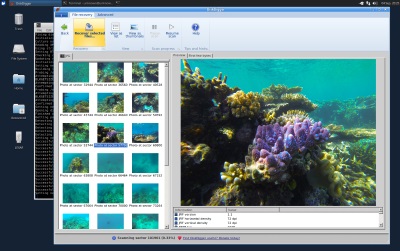 Another quick update to DiskDigger for Windows (and Linux)! Here is what's new in the latest version:
- Improved support for recovering Bitcoin wallet files (Wallet.dat files from Bitcoin Core, and .Wallet files from Armory) when scanning in "dig deeper" mode.
- Greatly improved compatibility with Linux and OS X. Since DiskDigger is built on top of the .NET framework, it's very simple to run it on *nix systems by using Mono.
- Further improvements for recovering .MP4, .MOV, .3GP, .M4A and similar video and audio files, with better metadata detection.
Download DiskDigger and recover your files with confidence today!
News for August 2017
Wed, 08/09/2017 - 22:10 — Dmitry Brant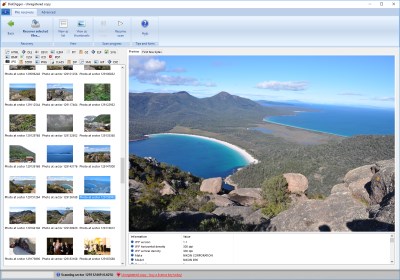 Time for another exciting update to DiskDigger for Windows! Here's what's new in the latest version:
- Support for recovering High Efficiency Image File Format files (.HEIC, .HEIF) when scanning in "dig deeper" mode.
- Support for recovering Bitcoin wallet files (Wallet.dat files from Bitcoin Core, and .Wallet files from Armory) when scanning in "dig deeper" mode.
- Enhanced support for recovering .MP4, .MOV, .3GP and similar video files, with better metadata detection.
- Enhanced support for recovering .M4A audio files, with metadata and album art previews.
- Improved detection of FAT32 and NTFS partitions on certain drives with 4 KB sectors, such as some newer hard disks and some models of iPods.
- Further improvements to saving and restoring of sessions when scanning in "dig deeper" mode.
- Improved ordering and sorting of recoverable files by date in "dig deeper" mode, for file types that contain dates in their metadata.
- Added a more emphatic warning when attempting to save recoverable files onto the same drive from which the files are being recovered. Remember: you must never recover files onto the same disk that is being scanned, since this has the risk of overwriting other files that haven't yet been recovered.
Download the new version and see what DiskDigger can recover for you!
News for July 2017
Sat, 07/08/2017 - 19:14 — Dmitry Brant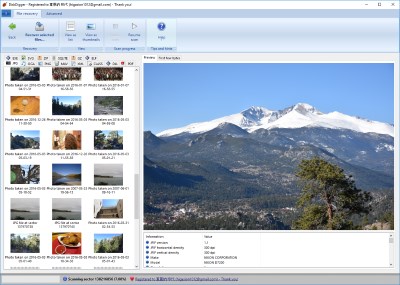 Just a quick (but substantial) update to DiskDigger for Windows! Here's what's new in the latest version:
- Improved scanning of disk images (.VHD, .VDI, and raw disk images).
- Better workflow for saving and restoring sessions when using Dig Deeper mode: the "Restore session" button now appears in the Advanced tab when selecting the types of files to recover. Once you select the session to restore, DiskDigger will resume scanning from where the session left off.
- Improved recovery logic for FAT32 and exFAT partitions when using Dig Deep mode.
- Improved user interface for right-to-left languages, such as Hebrew and Arabic.
Download the new version and recover your lost files with ease.
News for February 2017
Tue, 01/31/2017 - 00:16 — Dmitry Brant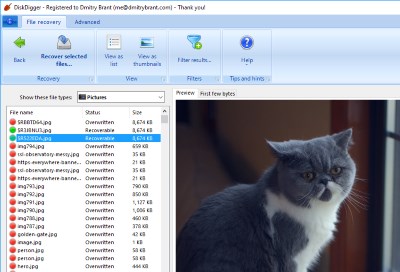 Time for another update to both the Windows and Android versions of DiskDigger! Here's what's new in the latest version of DiskDigger for Windows:
- Improved detection of partitions on corrupted drives. Even if the partition table on your disk is corrupted or overwritten, DiskDigger will attempt to search for recoverable partitions independently of the partition table, and let you recover files from these lost partitions.
- When recovering files in "Dig Deep" mode, you can now filter recoverable files by general file types, such as "Pictures", "Documents", "Presentations", etc. This will automatically show you only files of the selected type, and make it easier to find the file(s) you're looking for. As before, you may also still apply a custom filter on the recoverable files, where you can search the files by name, size, and folder location.
- In "Dig Deep" mode, improved detection of whether or not a file is recoverable. DiskDigger provides hints of whether a file is recoverable by showing a red or green dot icon next to the file. This functionality has been expanded and improved in this update, to give you more confidence of the recoverability of each file.
- Fixed possible issues when recovering files larger than 2 GB. On certain filesystems, recovering a very large file may have resulted in an empty file. This has been fixed.
And here are the updates for the latest version of DiskDigger for Android:
- Improved compatibility with older versions of Android (all the way down to Android 2.3, Gingerbread).
- Improved messages and warnings when recovering large quantities of files.
- Support for recovering SQLite databases. This is usually the format used for storing SMS messages and contact information. Recovering deleted messages and contacts from these databases is not yet part of DiskDigger, but is planned for a future version.
